
rclip 3: better and 6x faster semantic image search

rclip 3 is out. It improves search quality and makes search up to 6x faster.
rclip is a command-line tool for searching local photos by text or by example image. If you’re new to it, start with the intro post here.
The major changes that shipped with this version are:
- rclip now uses OpenCLIP’s top-performing ViT-B/32 model, which improves benchmark accuracy. On ImageNet-1k, rclip 2 reached 58.78% top-1 accuracy and 84.21% top-5 accuracy, while rclip 3 reaches 68.73% top-1 accuracy and 89.59% top-5 accuracy.
- rclip now searches up to 6x faster (depends on your OS and hardware). For example, text search on M1 Max went from 2.12 seconds to 0.57 seconds (3.72x speedup and near-instant feel), while image-to-image search on the same machine went from 3.84 seconds to 0.63 seconds (a 6.09x speedup!).
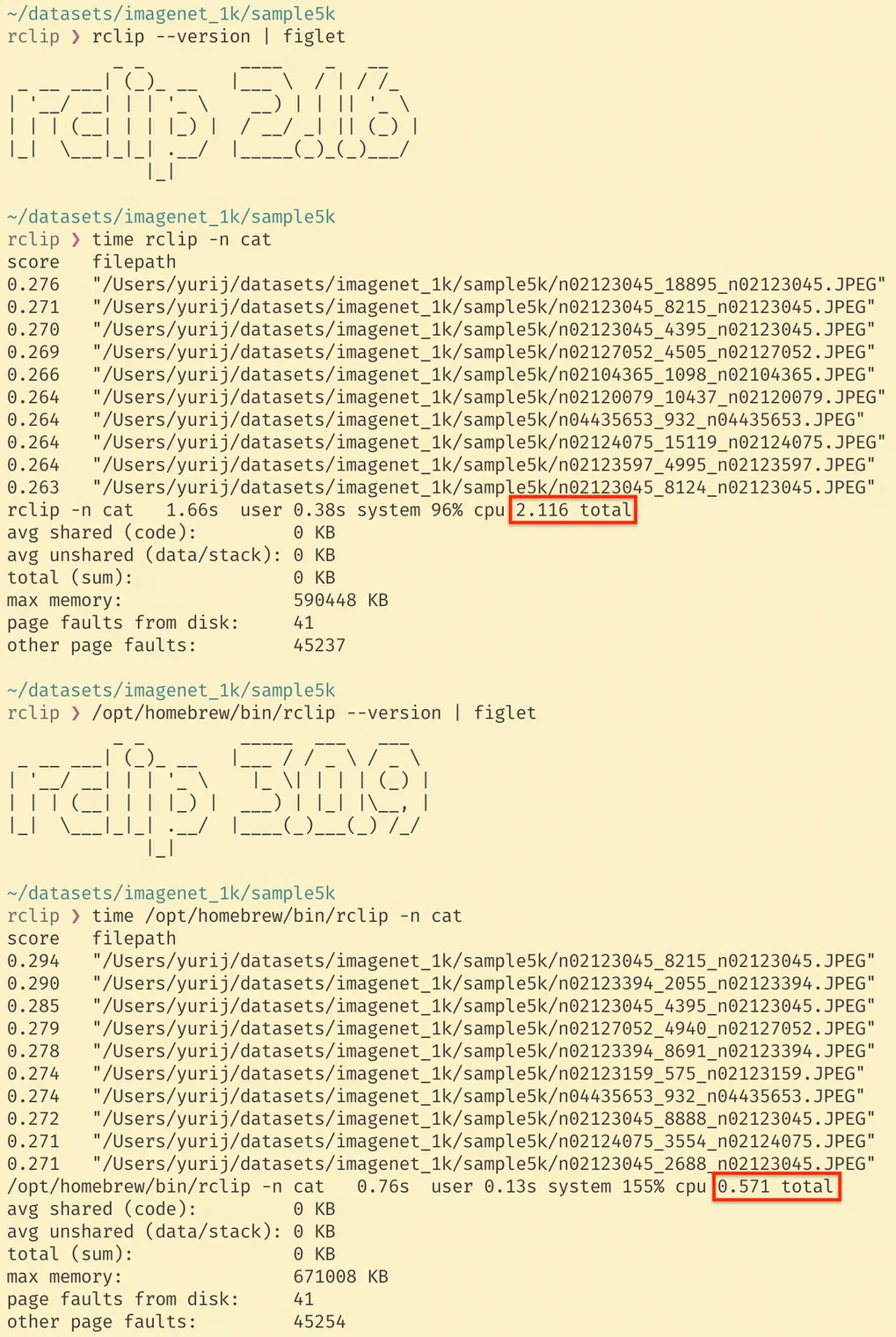
Real-world gains will vary by photo collection.
Before I talk about the implementation details, I invite you to install the latest version. Follow the installation instructions from the README to do so. Since rclip now uses a new model, it’ll have to reindex your images.
Under the hood, these gains came from two independent changes.
The model change was long overdue. The original OpenAI CLIP model was no longer the best default choice, and the benchmark gains above made the switch worth it.
The runtime change was enabled by replacing the large and slow-to-load PyTorch with onnxruntime, which loads very fast, packages better, and provides very similar performance to PyTorch when run on a CPU. Most of the search speed gains came from getting rid of long PyTorch loading times.
The only caveat with the switch to onnxruntime was that Apple Silicon support in PyTorch is better during batch processing, so indexing speeds on Apple Silicon regressed. To fix this, rclip 3 for macOS ships with one more execution backend: coremltools, which is provided by Apple and optimized for macOS. coremltools has the same slow startup downside as PyTorch, so rclip 3 uses it on macOS only for indexing, while defaulting to onnxruntime for search. Thanks to the coremltools optimizations, indexing speeds on macOS went up. In my tests, I got 180 images per second, which is 12.5% faster than the 160 images per second I had been getting with PyTorch.
These improvements also come in a smaller package. For example, the rclip Windows MSI installer went from 172 MB in 2.1.6 to 59 MB in 3.0.9. rclip snap went from 224 MB to 57 MB. I realize that these days, a lot of people don’t care about download sizes, but it’s hard not to appreciate the software that needs less: less compute, less space. Also, as a person obsessed with great UX and responsive apps, I am really happy that downloading and installing rclip got faster, too.
If you’ve been looking for a great text-to-image and image-to-image semantic photo search that lets you mix images and text queries and preview image search results in the terminal, it just got faster. Install rclip, let it reindex with the new model, and let me know what you think.
Stay curious!